 Kodla
KodlaKodla › Guides
Wi-Fi QR code: guests join without typing the password
Guests point the phone camera at the code and join your network, with no spelling out a long password. The iPhone camera and most modern Android phones read Wi-Fi codes without extra apps.
Step by step
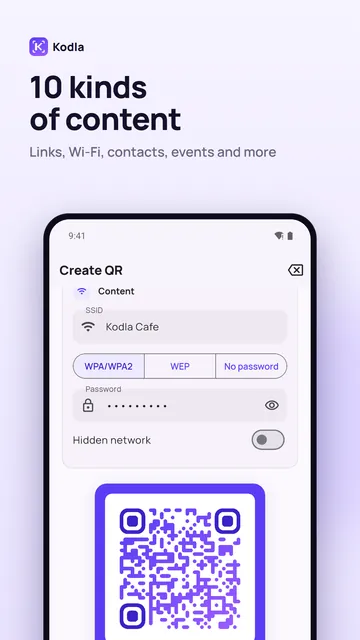
- On the «Create» tab choose «Wi-Fi».
- Enter the network name exactly as it appears in the Wi-Fi list (capital letters matter) and the password.
- Choose the security type: WPA/WPA2 for most routers, or «No password» for an open network. Turn on «Hidden network» only if your network doesn't appear in the list.
- Style the code: colors, a template or a frame with text like «Scan for Wi-Fi».
- Tap «Save image». Kodla test-scans the code before saving.
- Print it and place it at the entrance, on tables or next to the router.
Before you print
- Scan the code once with your own phone and check that it connects.
- If you change the Wi-Fi password, make a new code. The old one stops working.
- Anyone who sees the code can join the network. For a café that's the point; at home, keep it where only guests see it.
- Kodla also scans Wi-Fi codes: open the result and tap «Connect».
Another guide
How to put a QR code on a photo
Place a QR code on your own picture in about a minute: pick a photo, move and resize the code, remove the white box and save in high resolution.
How to make a QR code with your logo
Put your logo in the centre of a QR code on your phone: pick a template, add the logo, colors and a frame. Kodla checks that the code still scans.
QR business card: your contact saved in one scan
Make a QR code that saves your name, phone, email and company straight to contacts. For a business card, badge or email signature. Free Android app.
QR code for Instagram, Telegram and WhatsApp
Make a QR code that opens your Instagram profile, Telegram channel or WhatsApp chat. Enter a username, style the code and print it. Free Android app.
Barcode generator: EAN-13, Code 128 and more
Make EAN-13, Code 128, UPC-A, Data Matrix and other barcodes on Android. Enter the data, check the preview and save a PNG for labels and price tags.