 Kodla
KodlaKodla › Guides
Barcode generator: EAN-13, Code 128 and more
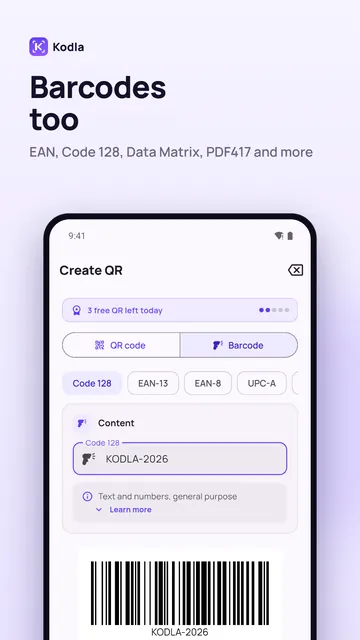
Kodla makes barcodes as well as QR codes: for products, price tags, warehouse labels and inventory. There are 10 types: Code 128, EAN-13, EAN-8, UPC-A, Data Matrix, PDF417, Aztec, Code 39, Code 93 and ITF.
Step by step
- On the «Create» tab switch from «QR code» to «Barcode».
- Pick the type in the strip. EAN-13 is for retail products; Code 128 is for labels, SKUs and anything with letters. «Learn more» explains each type.
- Enter the data in the «Content» card. For EAN-13, 12 digits are enough: Kodla adds the 13th check digit itself. If you type all 13, the last one must be correct.
- If you see «Invalid data for this barcode type», the length or the characters don't fit: for example, letters in EAN-13 or an odd number of digits in ITF.
- Check the preview and tap «Save image» to put a PNG in the gallery, or «Share» to send it.
Before you print
- Kodla draws the barcode but doesn't issue numbers. To sell in shops you need an EAN number registered to your company with GS1 in your country. The first digits show the country (478 = Uzbekistan).
- For your own needs — a warehouse, inventory, internal labels — Code 128 with your own numbering is enough.
- Code 128 encodes Latin letters, digits and common symbols; Cyrillic letters won't work.
- Don't stretch the image in one direction, keep the white margins at the sides and print black on white. Scan a test print before printing a batch.
- Barcodes are free: they're saved as PNG and count toward the 5 free saves a day.
Another guide
How to put a QR code on a photo
Place a QR code on your own picture in about a minute: pick a photo, move and resize the code, remove the white box and save in high resolution.
Wi-Fi QR code: guests join without typing the password
Create a QR code that connects phones to your Wi-Fi without typing the password. Print it for a café, office or home. Free Android app.
How to make a QR code with your logo
Put your logo in the centre of a QR code on your phone: pick a template, add the logo, colors and a frame. Kodla checks that the code still scans.
QR business card: your contact saved in one scan
Make a QR code that saves your name, phone, email and company straight to contacts. For a business card, badge or email signature. Free Android app.
QR code for Instagram, Telegram and WhatsApp
Make a QR code that opens your Instagram profile, Telegram channel or WhatsApp chat. Enter a username, style the code and print it. Free Android app.